Our Blog

Personal Branding for Remote Workers: Why Your Digital Business Card Is Your Most Powerful Asset
In a remote working world, nobody sees you walk into a room. Nobody notices how you dress, how you carry yourself, or how you shake a hand. What they see instead is your digital footprint and that's where your personal brand either wins or loses. For any freelancer navigating this landscape, a digital business card isn't just a convenience. It's your most powerful professional asset.
This post breaks down what personal branding actually means for remote professionals and how to build it without spending a fortune.
What Personal Branding Actually Means for Remote Workers
Personal branding isn't about having a fancy logo or a perfectly curated Instagram feed. It's about being immediately recognizable and consistently trustworthy in your niche.
For a remote working professional, that means when someone searches your name or receives your details they instantly understand who you are, what you do, and why they should care.
Your digital business card is the first touchpoint that makes or breaks that impression.
The Problem With Being Forgettable Online
Think about the last networking event you attended virtual or in-person. How many people did you meet? How many do you actually remember?
The ones who stand out share one thing: a clear, memorable presence that followed them after the conversation ended. They sent a link. That link was polished, fast, and on-brand.
That link was a digital business card. And if you don't have one yet, you're the one being forgotten.
What a Great Freelancer Digital Business Card Includes
A strong personal brand isn't built on a 10-page website. It starts with one page done exceptionally well. Here's what to include:
A clear headline — State your name, your role, and who you serve. "UX Designer for fintech startups" is infinitely more memorable than "creative professional."
Your best work — Two or three portfolio links, maximum. Quality over quantity. Let the work speak first.
Social proof — A short testimonial from a past client or collaborator adds credibility instantly. One is enough to shift trust.
A single contact CTA — Make it effortless. One button, one action. "Send me a message" or "Book a 15-minute call."
Your brand colors and tone — Consistent visuals signal professionalism. MobileFirst-Personal lets you customize every color, font, and layout element with no design experience needed.
How MobileFirst-Personal Builds Your Brand in One Session
The biggest barrier to building a strong personal brand is usually time. Most freelancers are already at capacity client work, admin, pitching. Finding hours to build a website from scratch isn't realistic.
MobileFirst-Personal solves this with two features that compress the build time dramatically. The AI assistant generates your page copy from a single keyword input. The drag-and-drop editor handles the layout visually, so there's no back-and-forth with a developer.
The result is a polished, mobile-first digital business card that reflects your brand built in a single focused session.
Personal Branding Is a Long-Term Investment
Every client you impress today becomes a referral tomorrow. Every polished touchpoint compounds over time more trust, more credibility, more inbound leads.
The remote working professionals who invest in their personal brand early are the ones who stop chasing clients and start attracting them. A digital business card is the smallest, fastest, highest-return investment you can make toward that goal.
And with MobileFirst-Personal's free Sandbox plan, the financial barrier is zero.
[INTERNAL LINK: MobileFirst-Personal Connector and Personal plans build your professional brand online]
Start Building Your Personal Brand Today
Your digital presence is working or it's not whether you're paying attention to it or not. Make it work for you. Create your free digital business card at MobileFirst-Personal.com
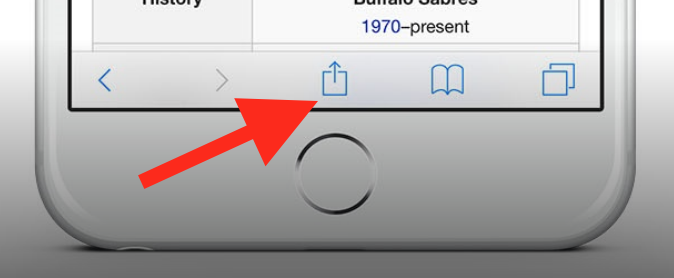
To add this web app to your homescreen, click on the "Share" icon
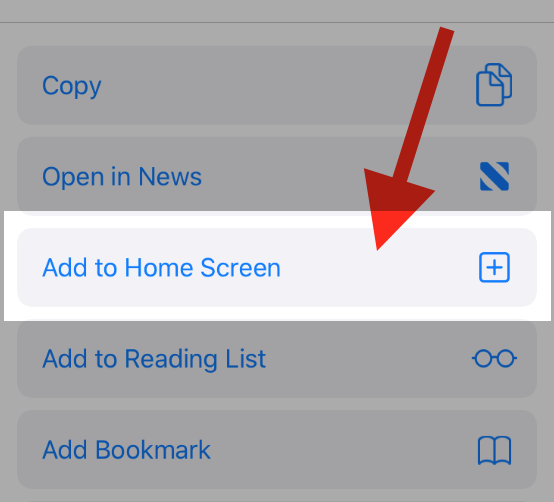
Then click on "Add to Home"
To add this web app to your homescreen, click on the "Share" icon
Then click on "Add to Home"
It looks like your browser doesn't natively support "Add To Homescreen", or you have disabled it (or maybe you have already added this web app to your applications?)
In any case, please check your browser options and information, thanks!
It looks like your browser doesn't natively support "Add To Homescreen", or you have disabled it (or maybe you have already added this web app to your applications?)
In any case, please check your browser options and information, thanks!