Our Blog
How to Write a Freelance Proposal That Wins Clients Every Time
Every freelancer knows the sinking feeling: you spent two hours writing a proposal, hit send, and heard nothing back. Winning a remote job or new client isn't just about being the most talented option it's about being the clearest, most trustworthy one. The good news is that a winning freelance proposal follows a repeatable structure. And your website can do half the selling before the proposal is even opened.
This post breaks down that structure and shows you how MobileFirst-Personal helps you close more deals with less effort.
The Anatomy of a Winning Freelance Proposal
Start With Their Problem, Not Your Skills
The single biggest mistake freelancers make in proposals is leading with themselves. "I'm a designer with 7 years of experience and a passion for clean aesthetics" is not what your client wants to read first.
They want to see that you understand their problem. Open every proposal by restating the challenge they shared with you in your own words, with specific detail. This immediately signals that you listened, you understood, and you're thinking about their outcome.
This approach applies to remote job applications too. Recruiters respond faster to candidates who lead with the company's pain point rather than their own resume.
Outline Your Approach in Three Clear Steps
After acknowledging their problem, show them how you'll solve it in three clear, jargon-free steps. Not a list of vague phases like "discovery, execution, delivery." Specific actions tied to specific outcomes.
For example: "First, I'll audit your existing content and identify the three highest-impact gaps. Then I'll build a 30-day editorial plan around those gaps. Finally, I'll deliver the first four articles and review performance data with you."
Specificity creates confidence. Confidence closes proposals.
Include One Relevant Work Sample
Don't attach your entire portfolio to a proposal. Pick one work sample that's as close as possible to what the client has asked for. Explain briefly why it's relevant what the challenge was, what you did, and what the result was.
One targeted example lands harder than ten generic ones. It shows judgment and saves the client time.
Your MobileFirst-Personal portfolio page is the perfect place to house these samples. Include a direct link to the relevant project in your proposal it's faster to click than an attachment and looks far more professional.
State Your Price Clearly and Without Apology
Vague pricing in a proposal signals inexperience. State your fee clearly, break down what's included, and specify the payment terms deposit, milestones, or full payment upfront.
If you offer multiple tiers, list them. If you have a single fixed price, state it and move on. Don't over-explain or apologize for your rate.
A well-structured pricing section on your website built in minutes with MobileFirst-Personal's drag-and-drop editor can actually be referenced directly in your proposal to add credibility and depth to your fee breakdown.
Close With a Single, Specific Next Step
End every proposal with one clear action. Not "let me know if you have any questions" that's passive and forgettable. Instead: "I've blocked Thursday and Friday this week for a 20-minute call. Here's my booking link pick a time that works for you."
A direct, confident close respects the client's time and moves the conversation forward.
Your Website Is Your Silent Proposal
Every proposal you send is strengthened by the website sitting behind it. When a client clicks through to a clean, mobile-first, professional site the deal is half done before you say a word. Build the website that closes your proposals at MobileFirst-Personal.com start free.
To add this web app to your homescreen, click on the "Share" icon
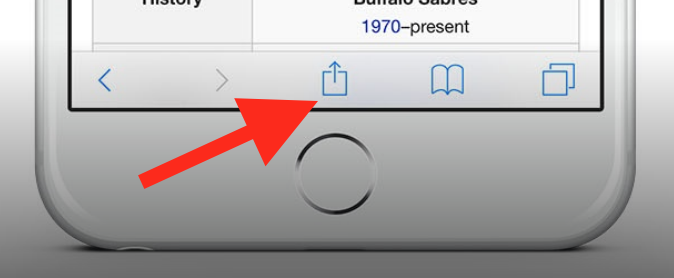
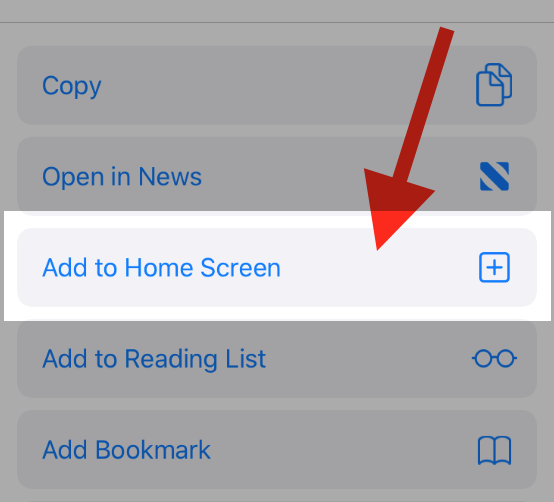
Then click on "Add to Home"
To add this web app to your homescreen, click on the "Share" icon
Then click on "Add to Home"
It looks like your browser doesn't natively support "Add To Homescreen", or you have disabled it (or maybe you have already added this web app to your applications?)
In any case, please check your browser options and information, thanks!
It looks like your browser doesn't natively support "Add To Homescreen", or you have disabled it (or maybe you have already added this web app to your applications?)
In any case, please check your browser options and information, thanks!